Unleash the combined power of Sharesight and AI: Product updates, November 2026
As well as working away at some bigger projects you'll see rolled out across the first half of next year, we've delivered some useful new features this month. They include beta releases of the Sharesight AI connector and a UK capital gains tax planner, as well as a portfolio weighting column on the Investments tab and new grouping options.
Introducing the Sharesight AI connector (beta)
We're starting a small beta rollout of the Sharesight AI connector, which lets you connect Claude or ChatGPT to your Sharesight account. Once connected, you can ask your AI questions about your portfolio, and it can answer using your up-to-date Sharesight data.
AI is only as good as the data it works with. The connector gives your AI the reliable portfolio data you've built up in Sharesight, then adds the power and flexibility of AI and the wealth of external information it can pull in, from company news to economic data. You could ask how a rate decision might affect your income stocks or how you're tracking against the market, and get answers that are both personal and well-informed.
A few things to know:
- It’s optional. We understand if you want to keep your Sharesight data away from AI. All our AI tools are optional and clearly labelled as AI. You can disable AI features entirely in account preferences, which also disables access to the AI connector for anyone you’ve shared your portfolio with.
- It's read-only. Your AI can see your portfolio data but can't change your trades, holdings or settings.
- It doesn't include tax data. The connector covers performance, holdings, dividends, trades and valuation.
- It's your AI tool. You're connecting your own AI to your data. Its answers come from that tool, not from Sharesight, and aren't financial advice.
The beta is currently open to Premium and Business customers who have both beta and AI features enabled in their account preferences. If you have a premium or business account and would like to join the beta, email us at support@sharesight.com.
We aim to expand its reach to a wider cohort early next year.
New UK capital gains tax planning tool (beta)
UK investors can now plan their capital gains tax with a clear view of where they stand and what each holding would realise if sold. The new capital gains tax planner brings it all together in one place, so you can make the most of your £3,000 annual exempt amount before the tax year ends on 5 April.
- See your position: See net realised gains year to date, how much of your brought forward allowance and losses are left, and your estimated taxable gains.
- Plan your next sale: Every holding shows the gain or loss you’d realise if sold today, in GBP, so it’s easy to spot where to use your allowance or offset gains with losses.
- Handle HMRC rules: Same-day, 30-day and Section 104 matching are applied automatically, and recent sales are flagged with a countdown to when the “bed and breakfast” window closes.
- Sort exemptions: UK gilts are excluded automatically, and any other holding can be marked as exempt.
The planner is rolling out to beta users on Standard, Premium and Business plans now. Those with UK individual portfolios held in a general investment account (GIA) will find it under Tax › Capital gains tax planner.
Portfolio weighting on the Investments tab
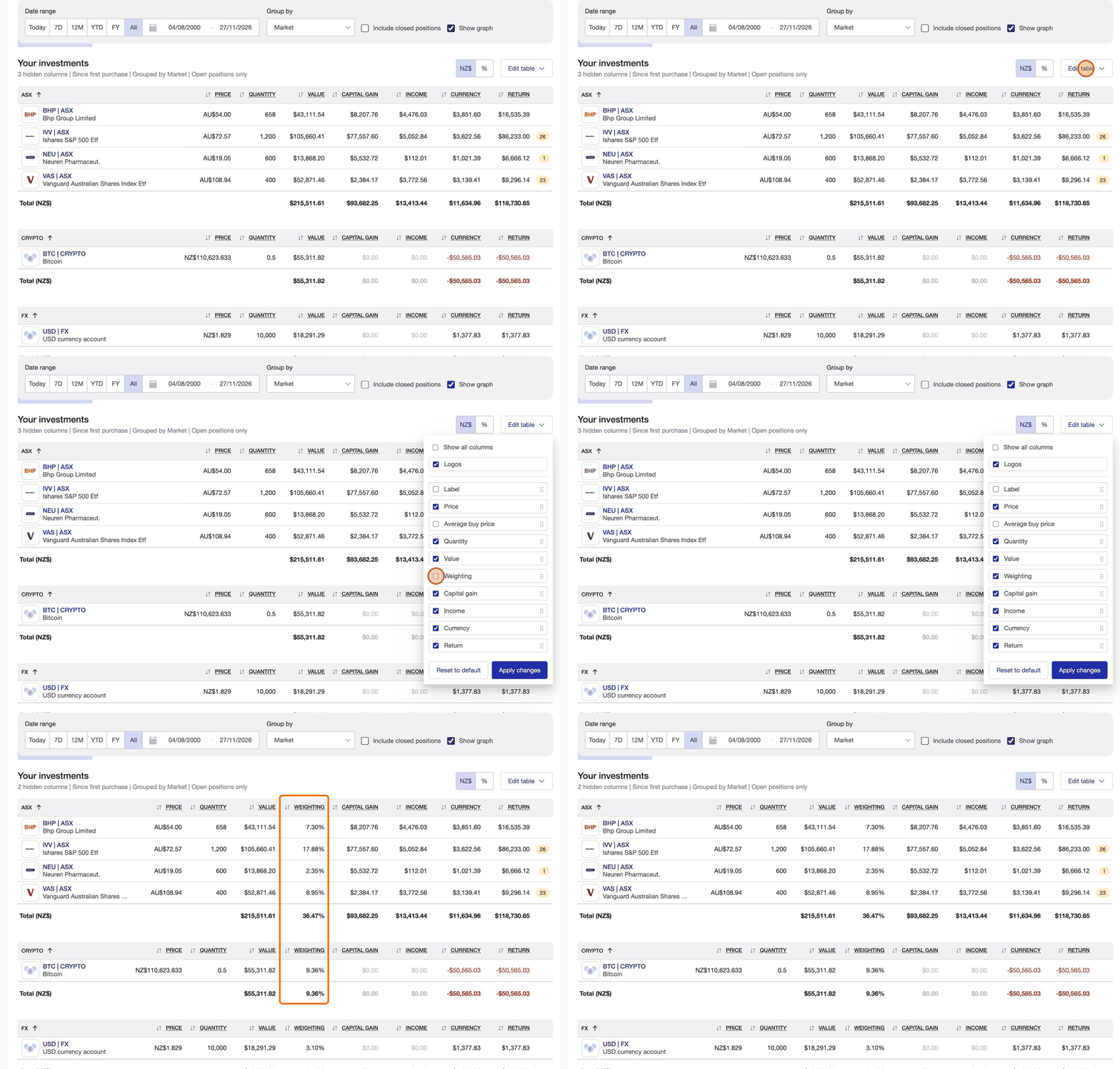
We’ve rolled out another highly requested feature – an optional weighting column on the Investments tab. It shows how much of your portfolio value each holding, or group of holdings, makes up. That puts the insights from the diversity report right alongside your performance figures and the other data on the Investments tab so you can see at a glance where your returns are coming from and how concentrated your portfolio is.
You can find the new column in the edit table dropdown. This column, like the diversity report, is only available on paid plans.
More new functionality and enhancements
- Group by broker: You can now group your holdings by broker on the Investments tab and most reports using the broker you've assigned to each holding on the Edit holding tab.
- Crypto grouped separately from currency: When grouping by investment type on the Investments tab and in reports, cryptocurrencies now appear in their own group rather than alongside currencies.
- Printer-friendly PDF reports: We've refined the layout of our PDF reports so they look cleaner and are easier to print.
Broker import functionality
Added support for:
- 17 broker trade confirmations
- 2 SnapTrade integrations
- 4 broker files


A new era for investing in New Zealand
Sharesight’s Ben Clendon and Alex Gardiner shared how Kiwis invest and trade, and what that meant for their performance at the NZSA Investor Conference 2026.


Beyond the Mag 7: Three overlooked US earnings results
Morningstar looks beyond the Magnificent Seven at three standout US earnings results – Ford, Intel and Corning – and the themes driving each stock.


October top trades: Investors buy the AI selloff
The Nasdaq had its worst month since March 2025 and Sharesight investors bought the dip. See October’s most traded shares, from NVIDIA to NextDC.