Tiger Brokers
How to import historical trades
Sharesight does not support options, Singapore or HK listed funds.
You need to convert Tiger statement csv file to Sharesight format before import into Sharesight.
- Login to your Tiger Brokers account and select the Report tile.

-
Under Statement, select date range to cover all trades since inception
-
Statement format: CSV
-
Click Export to download the file
-
Go to Gemini
-
Upload the file
-
Copy paste the prompt below
Transform the provided trade file into a CSV that can be directly imported into Sharesight.
Output Requirements Headers must match exactly File must be ready for direct import into Sharesight Exclude any rows that do not meet the filtering rules below Format: Markdown Table (This allows me to use 'Open in Sheets') Output the complete full table. Do not truncate the output or show a preview.
Row Filtering Rules Include only rows where Activity Type is: Open Close Include only rows where Symbol is NOT BLANK Ignore all other rows
Column Mapping Rules Column A – Trade date Header: Trade date Source column: Trade time Format: YYYY-MM-DD
Column B – Trade type Header: Trade type Source column: Activity type Mapping: Open → BUY Close → SELL
Column C – Ticker code Header: Instrument code Source column: Symbol Rule: Extract the ticker symbol found inside the last set of parentheses. The extracted text must consist of capital letters and periods. Examples: Northrop Grumman (NOC) → Ticker: NOC Airbnb, Inc. (ABNB) → Ticker: ABNB Berkshire Hathaway (BRK.B) → Ticker: BRK.B
Column D – Market code Header: Market code Source column: Exchange Rule: If Exchange is ARCA, change to NYSE
Column E – Price Header: Price Source column: Trade Price
Column F – Quantity Header: Quantity Source column: Quantity
Column G – Brokerage Header: Brokerage Source column: Sum of (Transaction fee, Other tripartite fees, Settlement fee, SEC fee, Option Regulatory fee, Stamp duty, Transaction levy, Clearing fee, Trading activity fee, Exchange fee, Future regulatory fee, Commission, Platform fee, Option settlement fee, Subscription fee, Redemption fee, Switching fee, PH Stock Transaction tax, Tax service fee AFRC Transaction Levy, Trading tariff, Transaction fee, Brokerage fee, Handling fee, Securities management fee, Transfer fees (CSDC), Transfer fee (HKSCC), Stamp Duty on stock borrowing, Consolidated audit trail fee, Processing fee, CM DA SI fee, DVP SI fee, IPO transaction fee, IPO process fee, IPO Settle fee, IPO Channel fee, and GST)
Column H – Brokerage currency Header: Brokerage currency Source column: Market Rule: Currency is based on the market country
-
Click Export to Sheets > Open Sheets
Gemini can make mistakes, so double-check it.
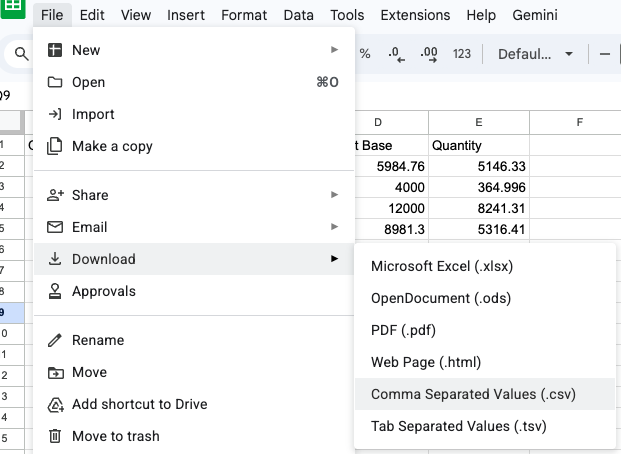
- Download the spreadsheet as .csv file
-
Login to Sharesight.
-
On the Get your investments into Sharesight page, select the Upload a self managed CSV tile.

-
Upload the file > Confirm upload
-
Follow the prompt to complete the import.